Filtering and organizing your Lead pipeline
Use lead status filters to manage and track inquiries efficiently.
Written by Swathi N
The Leads section in Lynk Tower helps you manage incoming inquiries from your website and integrations. As the number of leads grows, it becomes important to organize them so you can easily track follow-ups and conversions.
Lynk allows you to categorize leads using different status options, making it easier to manage your lead pipeline.
Using Lead Status to Organize Your Inbox
Each lead in the system can be assigned a status based on its progress. These statuses help you understand where each inquiry stands and what action is required next.
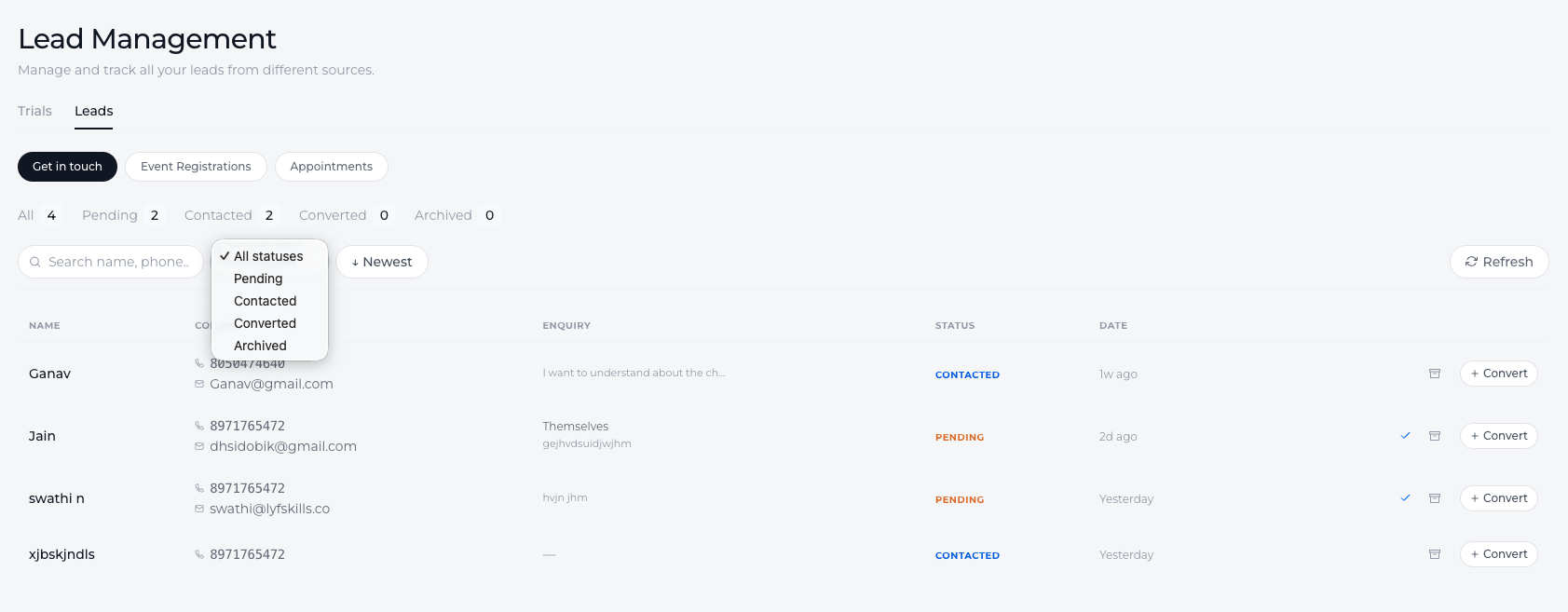
The available statuses include:
Pending
Contacted
Converted
Archived
By updating the status of each lead, you can keep your inbox organized and ensure that no inquiry is missed.
Understanding Lead Status Types
Pending
Pending is the default status assigned when a new lead is received.
This indicates that the inquiry has been submitted but has not yet been contacted or reviewed.
Use this status to quickly identify new leads that require follow-up.
Contacted
Once you reach out to the lead—through a call, message, or email—you can update the status to Contacted.
This indicates that communication has been initiated and the lead is currently being followed up.
Converted
If the lead successfully enrolls in a class, books a program, or becomes a student, you can mark the lead as Converted.
This helps you track which inquiries have successfully turned into enrollments or customers.
Archived
If a lead is no longer relevant or does not require further follow-up, it can be marked as Archived.
Archiving helps keep the active lead list clean while still maintaining a record of past inquiries.
Filtering Leads by Status
To quickly find leads at different stages of the pipeline, you can use the status dropdown filter.
This allows you to:
View only new leads (Pending)
Track leads that are currently being followed up (Contacted)
Identify successful conversions (Converted)
Hide inactive leads by moving them to Archived
Using filters helps teams focus on the leads that require immediate attention.
Conclusion
Organizing your lead pipeline in Lynk Tower helps you manage inquiries more effectively. By updating and filtering leads using statuses like Pending, Contacted, Converted, and Archived, you can keep your inbox structured and ensure that every potential student receives the right follow-up.