How to invite new guests via phone number
Add and invite external participants quickly using their phone numbers.
Written by Swathi N
In Lynk Tower, you’re not limited to inviting just existing students or leads. You can also invite new guests or external participants by manually adding their phone numbers.
This is useful when you want to reach people who are not yet part of your system.
When Should You Use This Option?
Inviting via phone number is helpful when:
You want to invite new leads or prospects
Participants are not in your student or lead list
You are promoting events externally
You collected contacts from offline sources
How to Add Phone Numbers
To invite new guests:
Go to the Events tab
Open the event you want to invite participants to
Click on the Invite button
Navigate to the Add Numbers tab
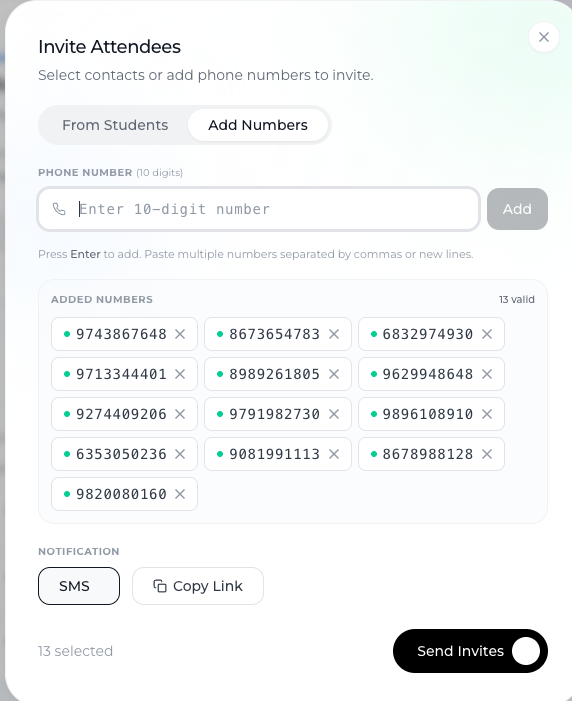
Entering Multiple Contacts
You can manually enter phone numbers
Add multiple numbers at once
Ensure numbers are correct before sending
This allows you to invite a group of new participants quickly.
Sending the Invitation
Once numbers are added, click Send Invite
Guests will receive an SMS with a registration link
They can click the link and register for the event
What Happens Next?
Guests receive the invite instantly
They can complete registration through the link
Once registered, they become part of your event participants
Best Practices
Double-check phone numbers
Ensure accuracy to avoid failed deliveries.
Use for external outreach
Ideal for marketing campaigns or offline contacts.
Keep communication clear
Make sure invitees understand the purpose of the event.
Conclusion
Inviting new guests via phone numbers in Lynk Tower makes it easy to expand your reach beyond your existing database. By adding multiple contacts and sending SMS invites with a registration link, you can quickly bring in new participants and grow your event audience.