Adding a venue contact person
How to add a contact person and phone number for a venue to ensure smooth coordination and communication for your coaching sessions.
Written by Swathi N
When you add a venue in Lynk Tower, you also have the option to include contact details for that location. Adding a Contact Person and Contact Phone Number helps you know who to reach out to for any venue-related queries.
This is especially useful when sessions take place at external facilities, training grounds, or shared spaces, where a specific person manages the location.
Why Add a Venue Contact Person?
Including venue contact details helps improve communication and coordination for your sessions.
Some common situations where this is helpful include:
Coordinating access to the venue before a session
Contacting the facility manager for entry or setup
Confirming availability of the location
Having a designated contact reduces confusion and ensures that sessions run smoothly.
Where to Add Venue Contact Details
When creating or editing a venue, you will see the following fields in the venue form:
Contact Person
Contact Phone Number
These fields allow you to store the primary contact details for that venue.
How to Add a Contact Person
Follow these steps to add venue contact information:
Step 1: Open the Venue Form
Go to the Venues tab in Lynk Tower and either create a new venue or edit an existing one.
Step 2: Enter the Contact Person
In the Contact Person field, enter the name of the person responsible for managing the venue.
Examples include:
Venue manager
Academy owner
Facility coordinator
Building administrator
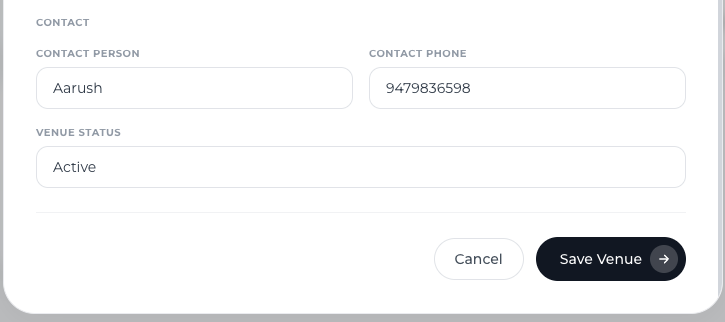
Step 3: Add the Contact Phone Number
Enter the Contact Phone Number of the person who manages the venue.
This number can be used by coaches or administrators if they need assistance related to the location.
Step 4: Save the Venue
Once the details are added, click Save Venue to store the contact information.
Best Practices for Venue Contact Details
To ensure effective communication:
Add the most relevant person responsible for the venue
Ensure the phone number is active and reachable
Update contact details if the venue management changes
Keeping this information updated helps avoid delays or confusion on session days.
Conclusion
Adding a venue contact person in Lynk Tower helps ensure that everyone involved knows who to contact for venue-related support. By including a contact name and phone number, you can improve coordination, resolve issues quickly, and make in-person coaching sessions run more smoothly.