How to edit a venue's address or contact details
How to update venue information such as name, address, contact details, and status to keep your coaching locations accurate and up to date.
Written by Swathi N
In Lynk Tower, venues represent the physical locations where your coaching sessions take place. If any information about a venue changes—such as the address, contact person, or phone number—you can easily update it using the Edit option on the venue card.
Keeping venue details updated ensures that you always have the correct location and contact information for sessions.
When Should You Edit a Venue?
You may need to update venue details in situations such as:
The venue address changes or needs correction
The contact person or phone number is updated
The venue name needs to be modified
The venue is temporarily inactive or no longer used
Updating these details helps maintain accurate records across your coaching operations.
Steps to Edit a Venue
Follow these steps to update a venue’s information.
Step 1: Go to the Venues Tab
Open the Venues section in Lynk Tower, where all your saved locations are listed.
Step 2: Click the Edit Button
Find the venue you want to update and click the Edit button on the venue card.
This will open the venue information form.
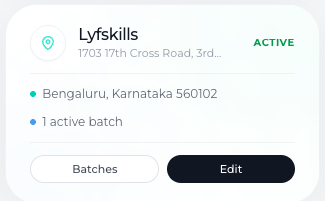
Step 3: Update the Venue Details
You can now modify the venue information as required.
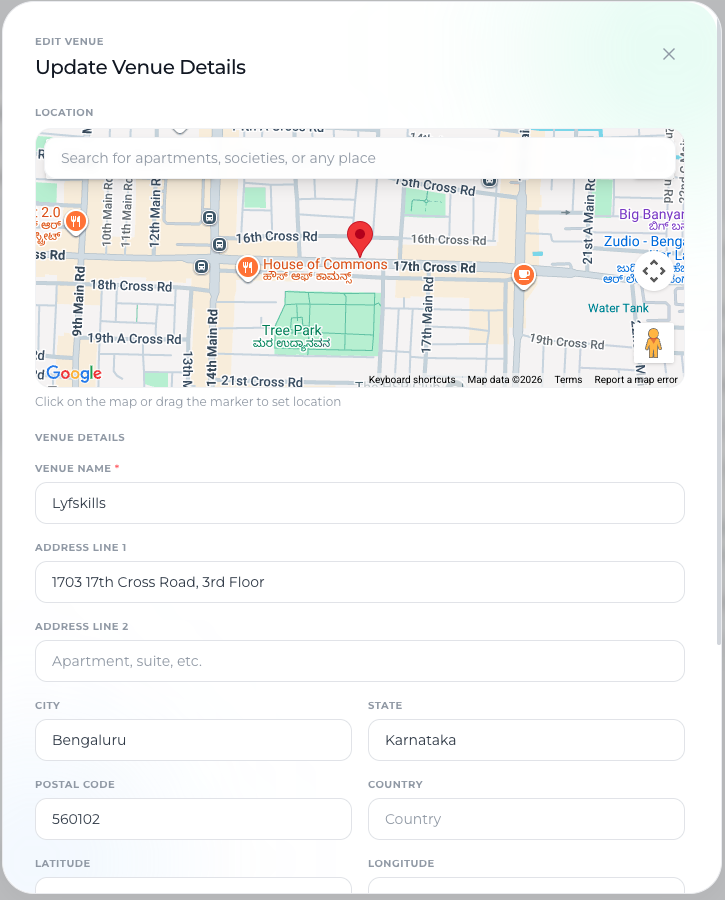
You can edit the following fields:
Venue Name
Update the name of the venue if needed to better identify the location.
Address Details
Edit the venue address fields such as:
Address Line 1
Address Line 2
City
State
Postal Code
Country
You can also update the latitude and longitude coordinates if the location marker changes.
Contact Person Details
Update the venue contact information if the responsible person changes.
Fields include:
Contact Person
Contact Phone Number
Venue Status
You can also change the venue status:
Active – The venue is available for scheduling sessions.
Inactive – The venue is currently not in use.
Saving the Updated Venue
Once you finish editing the venue details:
Review the updated information.
Click Update Venue.
The updated details will now be saved and reflected wherever the venue is used in your batches or sessions.
Conclusion
Editing venue details in Lynk Tower ensures that your coaching locations remain accurate and up to date. By updating the venue name, address, contact details, and status, you can maintain reliable location information and ensure smooth coordination for in-person coaching sessions.