How to invite existing students to an event
Send quick invitations to your students and leads via SMS with a direct registration link.
Written by Swathi N
Inviting participants to your events is simple and efficient in Lynk Tower. You can directly reach out to your existing students or even leads, allowing them to register for the event through a shared link.
Why Invite Students to Events?
Inviting your existing audience helps you:
Increase event participation
Engage your current students and prospects
Promote workshops, webinars, or special sessions
Drive better conversion from leads to attendees
How to Invite Participants
To invite students or leads:
Go to the Events tab
Open the event you want to invite participants to
Click on the Invite button
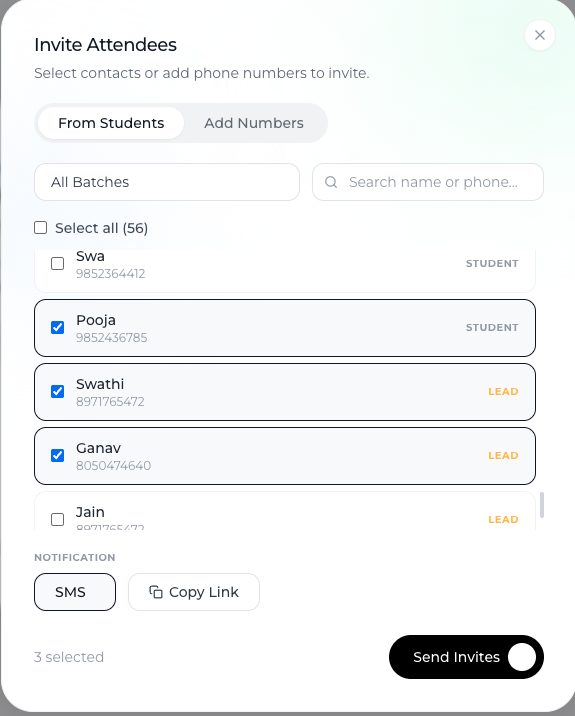
Selecting Participants
Once you click Invite, you’ll see options to choose who to invite:
From Students Tab
Select from your list of students
Easily choose one or multiple participants
Inviting Leads
You can also invite leads
This helps bring potential customers into your event funnel
Sending Invitations via SMS
Invitations are sent via SMS
Each recipient receives a registration link
They can click the link and register directly for the event
This makes the process fast and accessible.
What Happens After Sending Invites?
Participants receive the event link instantly
They can complete their registration
Their responses are tracked within your event
Conclusion
Inviting participants in Lynk Tower is seamless. By using the Invite option, you can select students or leads and send them SMS invitations with a direct registration link—making it easy to drive attendance and engagement for your events.