How to mark student attendance and complete a session
How administrators can mark attendance and complete a session when needed.
Written by Swathi N
In Lynk Tower, session completion and attendance tracking ensure that every class is properly recorded. While coaches normally manage session progress from the Lynk mobile app, administrators can step in and complete a session from Lynk Tower if the coach forgets to do so.
This helps organisations maintain accurate attendance records and completed session logs.
Who Can Complete a Session?
Coaches:
Coaches use the Lynk App to update the session timeline during the class (for example: starting the session or marking attendance).
Admins:
Administrators use Lynk Tower. If a coach forgets to complete a session, the admin can manually mark attendance and complete the session from the dashboard.
How to Mark Attendance and Complete a Session
Follow these steps to complete a session and record attendance:
Go to the Sessions tab in Lynk Tower.
Find and click the session in the calendar.
Open the session details window.
In the Timeline tab, click Complete Session.
A popup window will appear with the list of students in that batch.
Check off the students who are present for the session.
Confirm the attendance and complete the session.
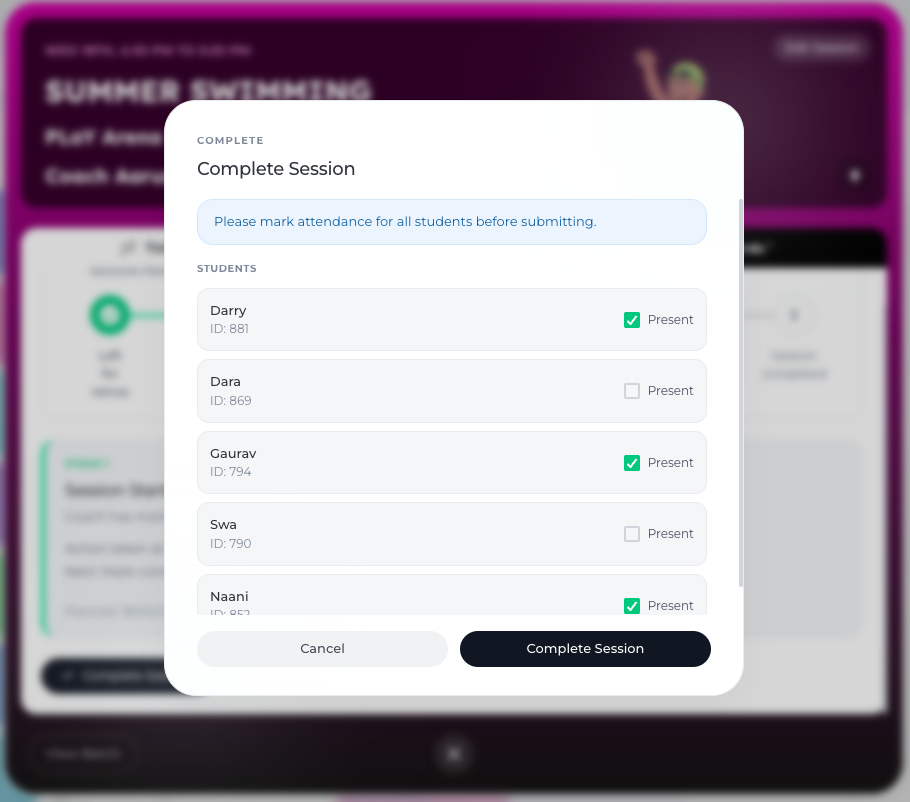
Once completed, the system updates the session timeline and records the attendance for that class.
When Should Admins Complete a Session?
Admins may need to complete a session when:
The coach forgets to complete the session.
The attendance was not marked during the class.
The session timeline was left incomplete in the coach’s app.
This ensures that attendance data and session history remain accurate.
Why Attendance Tracking Matters
Recording attendance and completing sessions helps organisations:
Maintain accurate student attendance records
Track session completion across batches
Ensure program schedules stay updated
Keep reliable reports and analytics
Conclusion
The attendance and completion workflow in Lynk Tower ensures that every class is properly recorded. While coaches manage sessions through the Lynk App, administrators can step in through Lynk Tower to mark attendance and complete sessions whenever necessary. This keeps the coaching schedule organised and the session records complete.