Understanding the Session Progress Timeline
How the session timeline helps you track the progress of a class from preparation to completion.
Written by Swathi N
In Lynk Tower, each session includes a progress timeline that shows the different stages of a class. This timeline helps coaches and organisations track what has happened during the session and what step comes next.
The session timeline acts as a step-by-step progress tracker, ensuring that every session follows a structured flow from the moment the coach prepares to leave for the venue until the session is completed.
Where to Find the Session Timeline
To view the timeline:
Go to the Sessions tab.
Click on any session card in the calendar.
Open the session details window.
Inside the session window, you will see the Timeline section, which shows the different stages of that session.
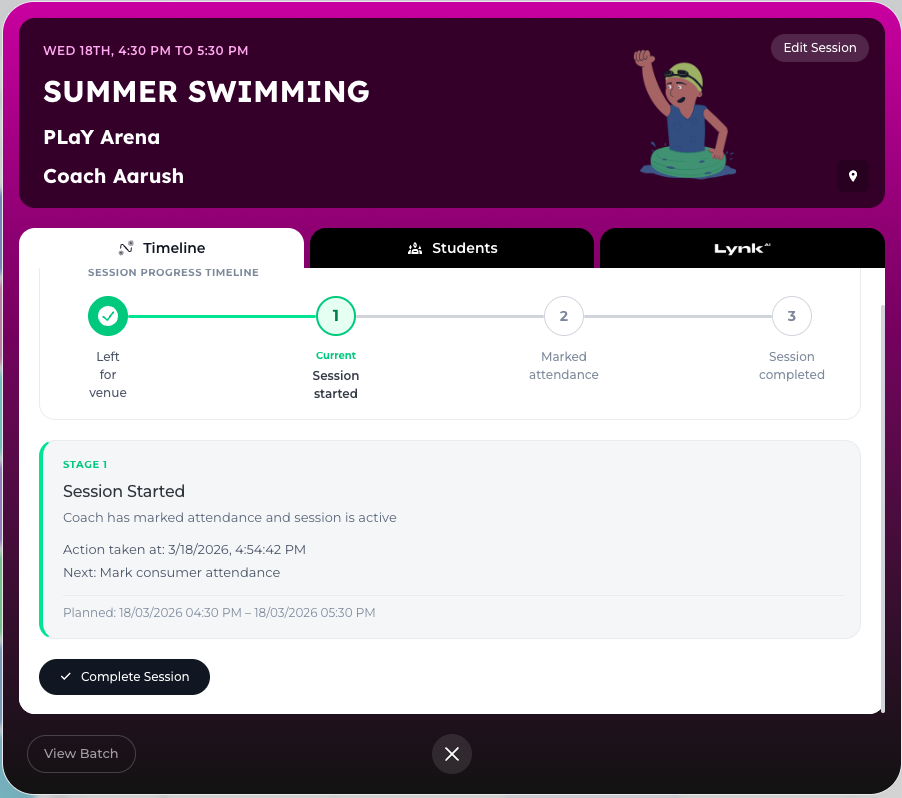
Stages in the Session Progress Timeline
Each session moves through several stages that represent the progress of the class.
The first stage in the timeline depends on the type of session and venue where the class is scheduled.
Left for Venue (Customer Venue)
For in-person sessions conducted at the student’s venue, the timeline begins with Left for Venue.
This indicates that the coach has started traveling to the student’s location for the session.
Ready for Session (External Venue)
For in-person sessions held at an external venue, the first stage appears as Ready for Session.
This indicates that the coach is ready to start the class at the venue.
Session Joined (Online Sessions)
For online sessions, the first stage is Session Joined.
This stage confirms that the coach has joined the online session and is ready to begin the class.
Session Started
This stage indicates that the class has officially begun.
When the coach starts the session, the timeline updates to show that the session is now in progress.
This helps track the actual start of the session compared to the scheduled time.
Marked Attendance
Once the session begins, the coach can record student attendance.
At this stage, the coach marks which students are present or absent for the session.
This step ensures accurate attendance tracking for the batch.
Session Completed
The final stage marks that the session has ended successfully.
When the coach clicks Complete Session, the system records that the class has finished and updates the session status.
Why the Session Timeline is Important
The session progress timeline helps coaches and organisations:
Track real-time session progress
Maintain structured session flow
Ensure attendance is properly recorded
Keep accurate records of completed sessions
It also helps administrators monitor sessions and ensure that no sessions remain incomplete.
Conclusion
The Session Progress Timeline in Lynk Tower provides a clear step-by-step view of each class. By adapting the starting stage based on the session type (student venue, external venue, or online) and tracking progress through attendance and completion, the platform ensures smooth session management for both coaches and administrators.