How to reassign a batch in an organisation
Reassign a batch when staffing changes or when a different coach needs to run the sessions in an organisation
Written by Sumit Kapoor
Introduction
Batch reassignment allows an organisation to change the coach responsible for conducting sessions without disrupting the batch structure, schedule, or enrolled consumers.
This is especially useful when:
A coach leaves the organisation
Workload needs to be redistributed
A batch requires a coach with different expertise
Temporary or permanent staffing changes occur
Reassignment ensures continuity of operations while maintaining organisational control.
When Batch Reassignment Is Needed
You may need to reassign a batch when:
The existing coach is no longer available
The coach has been removed from the organisation
The batch is expanding or changing focus
An admin wants to take over temporarily and assign later
Reassignment does not affect completed sessions and applies only to future execution.
Who Can Reassign a Batch
Only users with admin-level access under the organisation can reassign a batch.
Coaches cannot reassign batches themselves.
Where to Reassign a Batch
Batch reassignment is done from the Batch Details screen.
The option is available inside the Edit Batch flow.
Step-by-Step: How to Reassign a Batch
1. Open the Batch Card
Go to Current Batches
Tap on the batch you want to reassign
This opens the batch detail view.
2. Edit the Batch
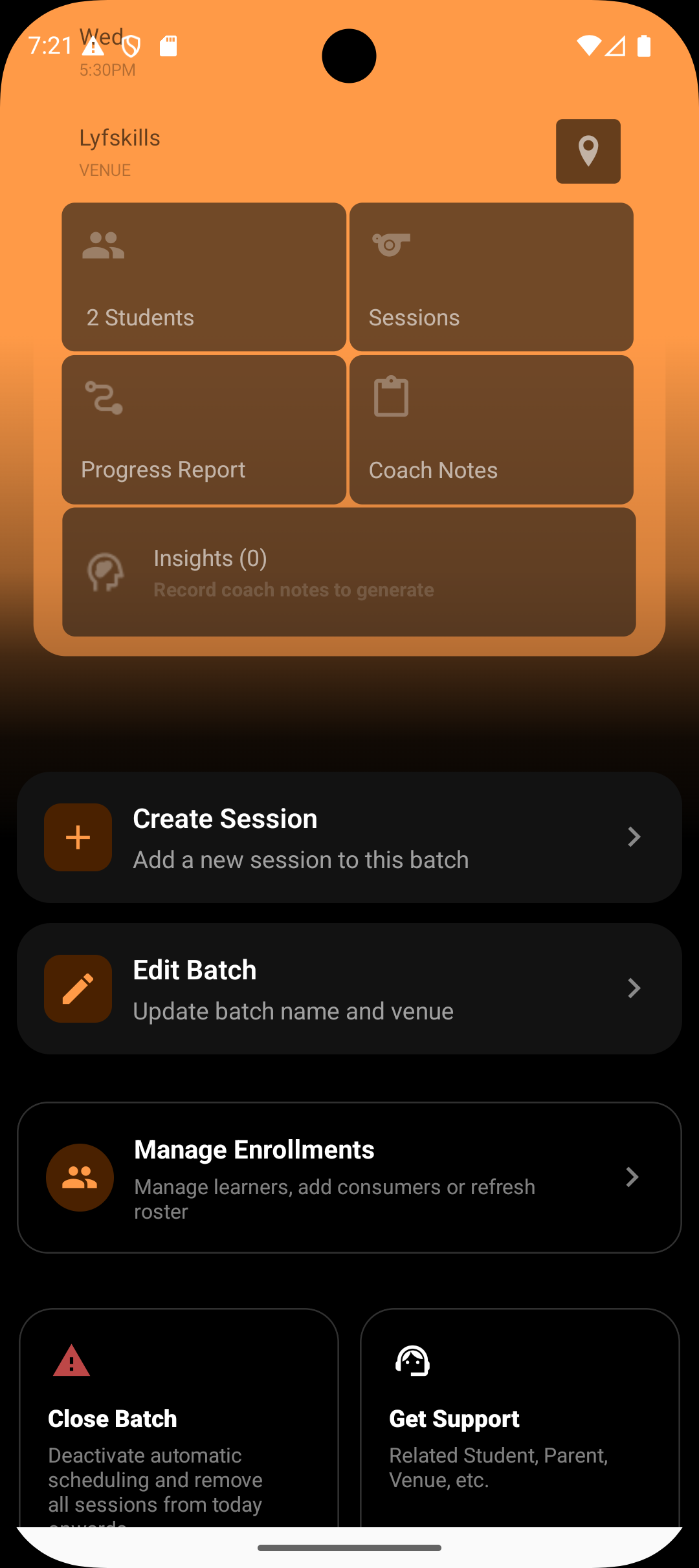
Tap on Edit Batch
Navigate to the Details section
The Details section contains core ownership and configuration controls.
3. Reassign the Coach
Under Details, you will see the option to Reassign Coach
Select a new coach from the organisation’s coach list
Only coaches who belong to the same organisation will be available for selection.
4. Save Changes
Confirm the reassignment
Save the batch
The new coach is now responsible for running future sessions.
What If a Batch Is Not Reassigned Immediately
If a coach is removed before reassignment:
The batch becomes unassigned
Admins can still run sessions
Operations remain active until reassignment is completed
This prevents downtime while allowing flexibility in staffing decisions.
Best Practices for Reassignment
Reassign batches before removing a coach whenever possible
Inform the new coach about upcoming sessions
Review batch notes and insights during handover
Use reassignment proactively to avoid session gaps
Why Batch Reassignment Matters
Batch reassignment ensures:
Business continuity during staffing changes
Clear accountability for session delivery
No disruption to students or schedules
Smooth operational handovers
It keeps the organisation resilient while remaining coach-flexible.
Summary
Reassigning a batch is a controlled, admin-level action that changes who runs the batch without affecting its structure or history. By allowing reassignment directly from the batch details, Lynk ensures organisations can adapt quickly to staffing changes while keeping sessions running without interruption.