How to contact a lead
Once a lead is created, Lynk shows the phone details shared in the enquiry so you can contact them directly. Contact options sit inside each lead, making follow-up fast and helping you understand needs and move them toward enrollment.
Written by Sumit Kapoor
Where contact actions are available
Contact options are available inside the Lead detail view.
To reach them:
Go to Profile → Leads
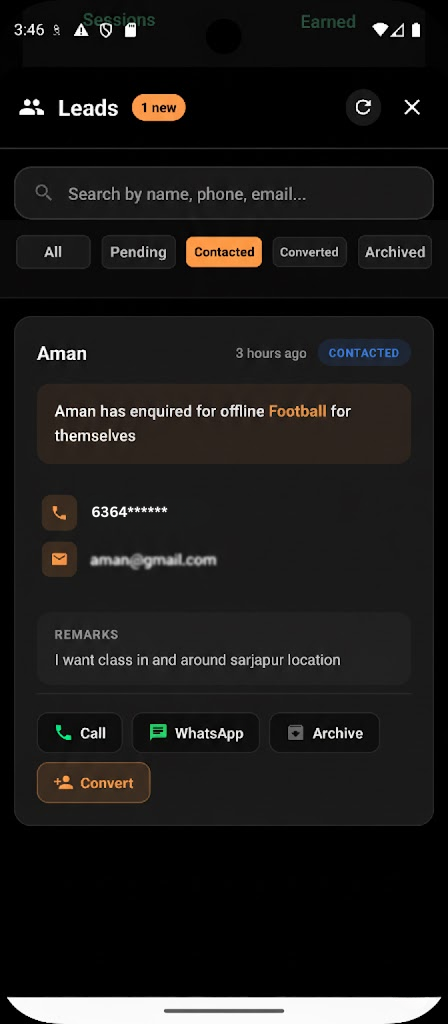
Lynk clearly displays the consumer’s phone number and email (if provided), along with quick-action buttons.
Ways to contact a lead
Lynk supports direct outreach using the consumer’s preferred communication channels.
Call
Tap the Call button to dial the consumer’s phone number instantly
Ideal for quick clarifications, availability checks, or urgent follow-ups
Tap the WhatsApp button to start a chat using the provided number
Useful for sharing batch details, schedules, or answering questions asynchronously
These actions use the contact information submitted by the consumer, ensuring communication stays relevant and intentional.
Updating lead status after contact
Once you’ve reached out:
Use Mark Contacted to update the lead’s status
This helps you:
Track which enquiries have been followed up
Avoid duplicate outreach
Keep your lead pipeline organized
Status updates are manual, so you remain fully in control of how and when a lead progresses.
Why direct contact matters
Direct contact enables you to:
Understand the consumer’s exact requirement
Clarify expectations, pricing, and format
Build trust early before enrollment
By centralizing contact actions within Lynk, coaches don’t lose context or delay responses.
What contacting a lead does NOT do
It does not automatically convert the lead
It does not create a student or consumer record
It does not commit you to an enrollment
Contacting a lead is purely the communication step—conversion remains a deliberate action.
Summary
Contacting a lead in Lynk:
Happens inside Profile → Leads
Uses built-in Call and WhatsApp actions
Relies on details shared by the consumer
Allows status updates to track follow-ups
This structured approach ensures that every enquiry is handled promptly, professionally, and with full visibility—turning interest into meaningful coaching conversations.