Understanding the Trials Dashboard
Learn how to track and manage trial class requests submitted through your website.
Written by Swathi N
Trial classes are one of the most common ways for parents and students to explore a program before committing to a full subscription. In Lynk Tower, all incoming trial bookings are organized in the Trials Dashboard, allowing administrators and staff to quickly view and manage new requests.
What is the Trials Dashboard?
The Trials Dashboard is a section within Lynk Tower that displays all incoming trial class requests from prospective students.
Each trial request provides key details that help you review and schedule the trial efficiently.
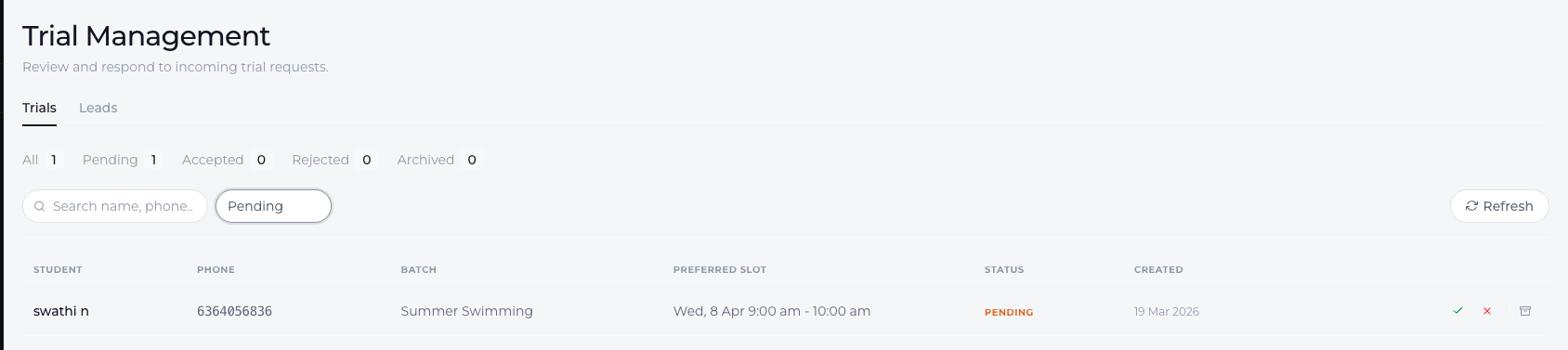
Typically, the dashboard displays information such as:
Student Name and Phone – The person requesting the trial
Requested Batch or Program – The class they want to try
Preferred Session Slot – The session timing selected during booking
This allows your team to quickly understand which class the student is interested in and when they would like to attend.
Where Trial Requests Come From
Trial requests are usually generated through your public website created using Lynk Tower.
When a visitor browses your My Storefront page, they can explore the available programs displayed in the Our Programs section. Each program card includes options such as:
Book Trial
Subscribe
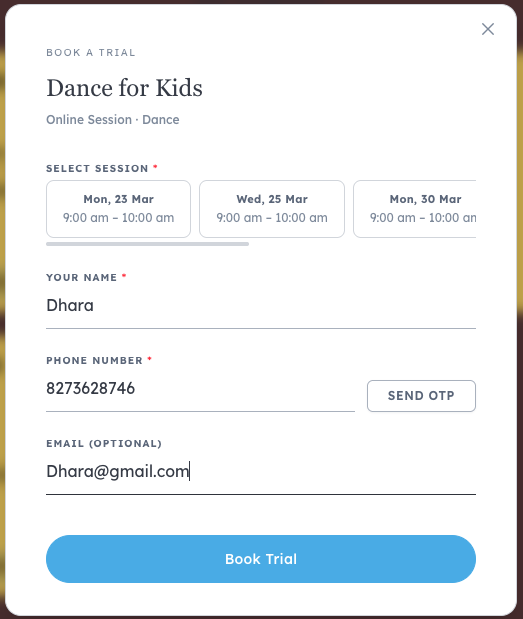
If the visitor clicks Book Trial, a booking form appears where they can:
Select an available session slot
Enter their name
Provide their phone number
Optionally add their email
Once the form is submitted, the trial request is automatically recorded in the Lynk Tower.
How Trial Requests Appear in the System
After a visitor submits the booking form, the request is sent directly to your workspace and appears in the Inbound → Trials section.
From here, your team can view:
The student’s contact details
The program or batch they selected
The preferred session slot
This centralized dashboard ensures that no trial requests are missed and every inquiry can be followed up promptly.
Why the Trials Dashboard is Important
The Trials dashboard helps academies and coaching centers manage potential students more efficiently.
Benefits include:
Centralized trial management
All incoming trial requests are stored in one place.
Faster follow-ups
Your team can quickly contact parents or students after they submit a request.
Better enrollment opportunities
Trials help convert interested visitors into long-term students.
Conclusion
The Trials Dashboard in Lynk Tower helps you track every trial request submitted through your website. By automatically collecting booking details from visitors and displaying them in the Inbound → Trials section, the platform makes it easy for your team to manage inquiries, schedule trial sessions, and convert interested prospects into enrolled students.