The Student View: Booking trials and buying subscriptions
Understand what visitors experience when they book a trial or subscribe to a program.
Written by Swathi N
When visitors browse your storefront created with Lynk Tower, they can directly interact with the programs you display in the Our Programs section. Each program card typically includes options such as Book Trial or Subscribe, allowing students or parents to quickly take action.
These options provide a simple way for visitors to try a class first or enroll in a program through a subscription plan.
Booking a Trial Class
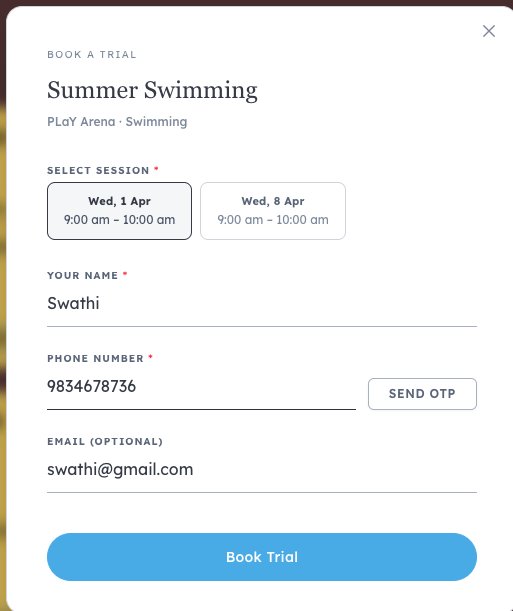
When a visitor clicks Book Trial on a program card, a trial booking window opens.
This window allows the visitor to select a session and provide their contact details.
Step 1: Select a Session
The visitor will see available trial sessions for the program.
They can choose a suitable date and time from the available options.
Step 2: Enter Contact Details
After selecting a session, the visitor needs to fill in the following details:
Full Name
Phone Number (required)
Email Address (optional)
These details help the academy contact the student or parent regarding the trial class.
Step 3: Confirm the Booking
Once the details are filled in, the visitor clicks Book Trial.
The trial session is then submitted as a request for the academy.
Subscribing to a Program
If a visitor wants to enroll directly, they can click Subscribe on the program card.
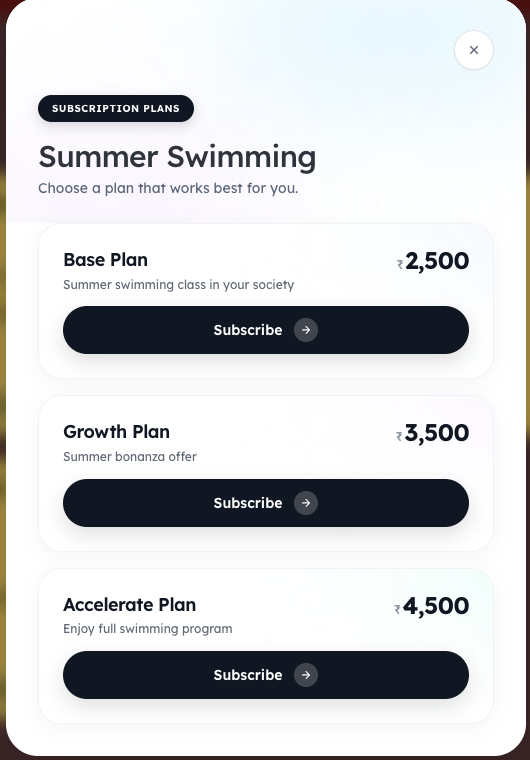
This opens a subscription plan window showing the available pricing plans for the selected program.
Choosing a Subscription Plan
The subscription page displays available plans for that program, for example:
Base Plan
Growth Plan
Each plan includes:
Plan name
Description of the plan
Subscription price
Visitors can review the options and select the plan that suits them.
Completing the Subscription
To enroll in the program:
The visitor selects the desired plan.
Clicks Subscribe.
Proceeds with the enrollment process.
Once completed, the student is registered for the program based on the chosen subscription plan.
Why This Experience Matters
The booking and subscription flow in Lynk Tower helps academies convert website visitors into students by:
Allowing quick trial bookings
Offering clear subscription options
Simplifying the enrollment process for parents and students
This streamlined process makes it easier for visitors to take the next step and join your programs.
Conclusion
The Book Trial and Subscribe options on your storefront provide a simple and user-friendly way for visitors to explore and enroll in your programs. By offering both trial sessions and subscription plans through Lynk Tower, academies can make the enrollment process faster and more convenient for students and parents.