How to edit the details of an upcoming event
Make quick updates to your event information without disrupting registrations.
Written by Swathi N
Managing events often requires small updates—whether it’s a timing change, updated description, or switching visibility. In Lynk Tower, you can easily edit your event details even after creation through a simple edit flow.
Why You Might Need to Edit an Event
Once an event is created, you may need to update details due to:
Changes in schedule or timing
Updates to the event description or agenda
Switching between Public and Invite Only visibility
Replacing or improving the cover image
Instead of creating a new event, you can simply edit the existing one.
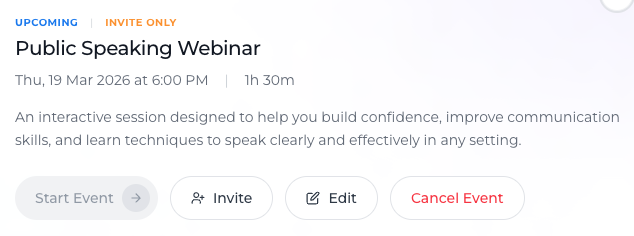
Accessing the Edit Option
To update an event:
Navigate to the Events tab
Open the specific event you want to modify
Click on the Edit button
This action opens a pop-up window where all editable fields are available.
What You Can Edit
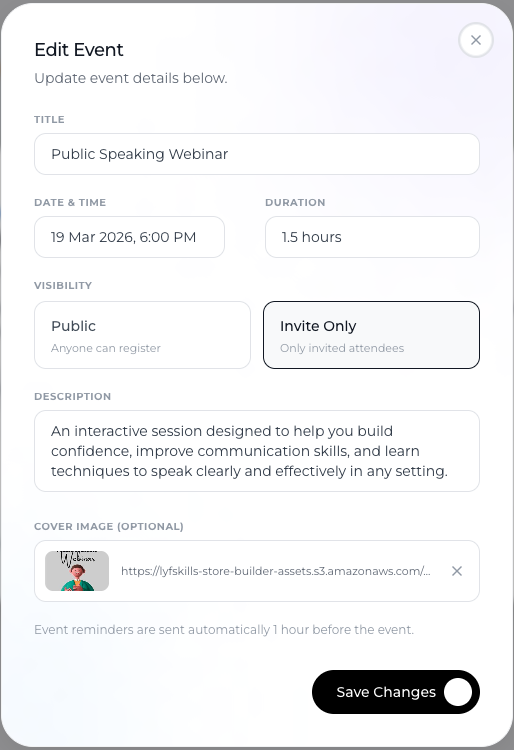
Inside the edit pop-up, you have full control over the core event details:
Event Information
Title – Update the name of your event
Description – Modify content to reflect the latest information
Schedule
Date – Change the event date
Time – Adjust the start time
Duration – Update how long the event will run
Visibility
Switch between:
Public (open access via link)
Invite Only (restricted access)
Visuals
Cover Image – Upload a new image or replace the existing one
How Changes Affect Your Event
Updates are applied instantly after saving
The latest details are reflected wherever the event is visible
Existing registrations remain intact
This ensures continuity while keeping your event information accurate.
Saving Your Updates
After making the required changes:
Review all updated fields
Click Save Changes
Your event will now reflect the new details.
Best Practices for Editing Events
Avoid last-minute changes
Try to finalize key details early to avoid confusion.
Communicate major updates
If you change date or time, inform registered participants.
Keep descriptions clear
Ensure the event information is always accurate and relevant.
Use consistent visuals
Update cover images to match the event theme or purpose.
When to Edit vs Create a New Event
Edit an event when:
Only details like time, description, or visibility change
The event structure remains the same
Create a new event when:
The topic or purpose is completely different
You are running a separate session
Conclusion
Editing an event in Lynk Tower is a seamless process. By accessing the edit option from the Events tab, you can update schedules, descriptions, visibility, and visuals without affecting existing registrations—ensuring your events stay accurate, professional, and well-managed.