How to create a new storefront
How to create and start editing your academy website using Store Builder.
Written by Swathi N
Creating a storefront in Lynk Tower allows you to publish a website where students and parents can explore your academy and learn about your programs.
You can start building your storefront using either a blank layout or a pre-built template.
Steps to Create a New Storefront
Follow these steps to create your storefront:
Log in to Lynk Tower.
From the left sidebar, click Store Builder.
You will be taken to the Store Builder dashboard where your storefronts are listed.
Click Create Store to begin.
Choose how you want to start building your storefront.
Choose How to Build Your Storefront
When creating a storefront, you can choose between two options.
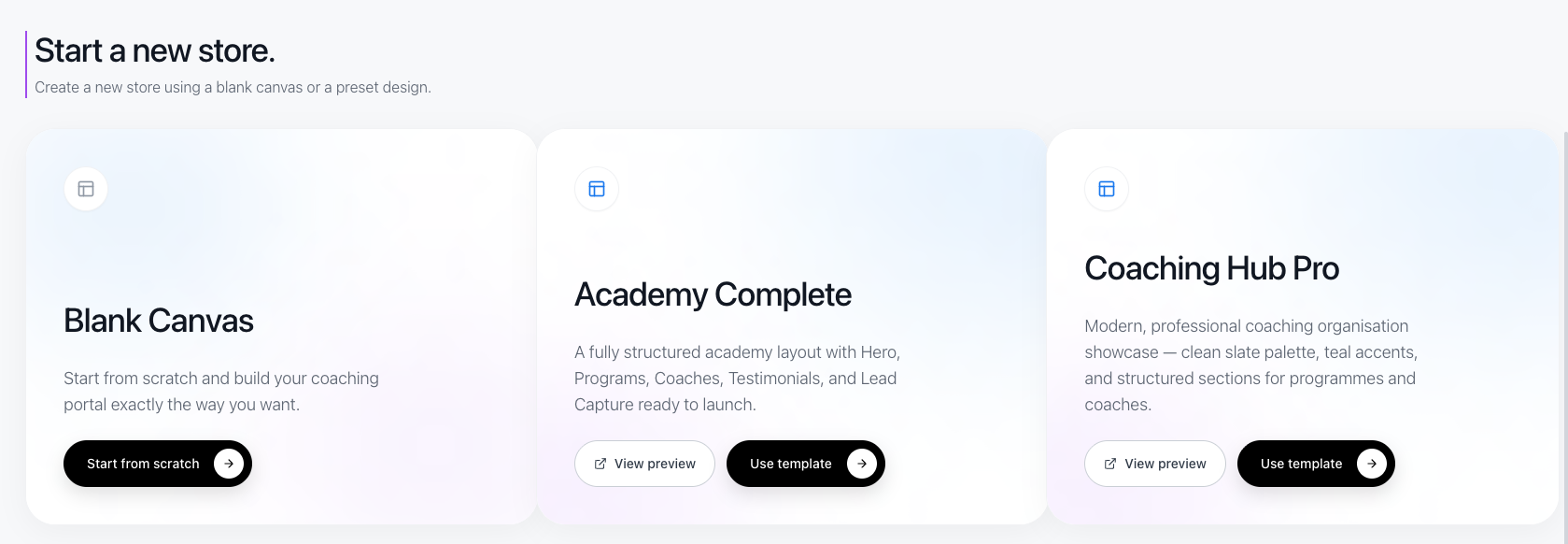
Blank Canvas
The Blank Canvas option allows you to build your storefront completely from scratch.
You can manually add sections such as:
Hero banner
About section
Programs
Lead capture form
Contact information
This option gives you full control over the layout and content.
Pre-Built Templates
If you want to set up your storefront quickly, you can choose from pre-built templates.
Some templates include:
Academy Complete
Coaching Hub Pro
These templates already include pre-designed sections such as program listings, testimonials, and contact sections, making it faster to launch your storefront.
Conclusion
Creating a storefront in Lynk Tower is a simple way to build your academy’s website. By choosing either a Blank Canvas or a pre-built template, you can quickly design a professional storefront and start showcasing your programs online.