How to add a WhatsApp chat button to your site
Allow visitors to instantly message your academy through WhatsApp.
Written by Swathi N
Adding a WhatsApp chat button to your storefront in Lynk Tower makes it easy for students and parents to contact you directly. Instead of filling out a form, visitors can quickly start a conversation with your academy through WhatsApp.
The WhatsApp button appears on your storefront and allows visitors to open a chat with the coach or academy in one click.

Adding the WhatsApp Chat Button
To add a WhatsApp button to your storefront:
Go to Store Builder in Lynk Tower.
Click Open Editor for the storefront you want to update.
In the Sections panel, select Contact on WhatsApp.
The WhatsApp settings will appear in the right-side configuration panel.
From here, you can configure the chat button details.
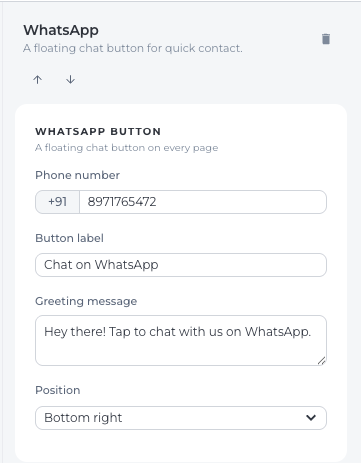
Entering Your WhatsApp Number
To enable WhatsApp chat, you need to add your contact number.
Enter your 10-digit WhatsApp phone number.
Make sure the number is active on WhatsApp so visitors can send messages successfully.
Once entered, visitors who click the button will be redirected to a WhatsApp chat with this number.
Setting the Button Label
You can customize the button label that appears on the storefront.
Examples include:
Chat with Us
Message on WhatsApp
Talk to a Coach
Contact on WhatsApp
Choose a label that clearly encourages visitors to start a conversation.
Creating a Custom Greeting Message
You can also set a default greeting message that appears when the WhatsApp chat opens.
For example:
“Hi, I’m interested in learning more about your classes.”
“Hello, I would like to know more about the programs.”
This message helps visitors start the conversation quickly without typing a new message.
Setting the Button Position
You can control where the WhatsApp button appears on the storefront.
The button can typically be positioned in a visible location so visitors can easily access it while browsing the page.
A floating position on the page ensures that the chat option is always accessible.
Why Use a WhatsApp Chat Button?
Adding a WhatsApp chat button in Lynk Tower helps academies:
Respond to inquiries instantly
Provide quick support to parents and students
Increase communication and engagement
Convert visitors into leads more easily
Many parents prefer messaging instead of filling forms, making WhatsApp a powerful communication tool.
Conclusion
The WhatsApp chat button in Lynk Tower allows visitors to contact your academy instantly. By adding your WhatsApp number, customizing the button label, setting a greeting message, and positioning the button effectively, you can make communication faster and more convenient for potential students and parents.