How to edit coach notes
Coach notes can be edited during review, but become locked once saved.
Written by Sumit Kapoor
Introduction
Coach notes in Lynk are designed to balance flexibility with record integrity. Coaches are allowed to refine and correct notes during the creation flow, but once notes are saved, they become a permanent part of the session history.
How the edit flow works
When you record coach notes, Lynk follows a deliberate review-first process:
Notes are first processed by Lynk AI, converting them into clear, structured English
The AI-generated notes are displayed on a review screen
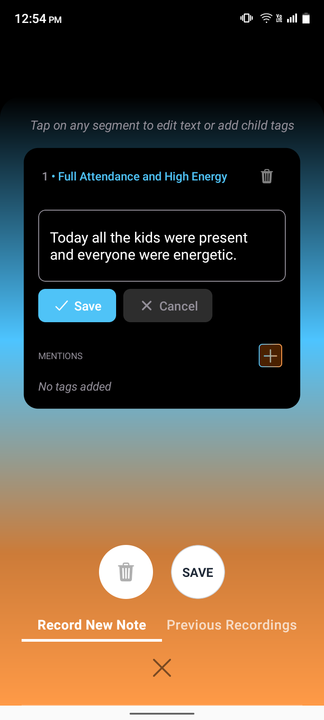
When you tap on the generated notes, you can:
Edit wording
Adjust after AI conversion or formatting
Refine tone or wording
This ensures the final version accurately reflects your intent.
AI assists in clarity — it does not auto-save or lock notes without review.
When coach notes can be edited
✅ Before saving
Notes are fully editable during the AI review stage
Tapping on the generated text opens it for editing
❌ After saving
Notes become locked
No further edits are allowed once saved to the session record
Why Lynk AI locks notes after saving
Coach notes often influence long-term decisions and analytics. Locking them after saving:
Preserves historical accuracy
Prevents retroactive changes to insights
Maintains trust across sessions and reports
Summary
In Lynk, coach notes can be edited by tapping on the AI-generated notes during the review stage. Once saved, they become permanent and cannot be modified. This flow ensures clarity, accuracy, and reliable session history without sacrificing flexibility.